
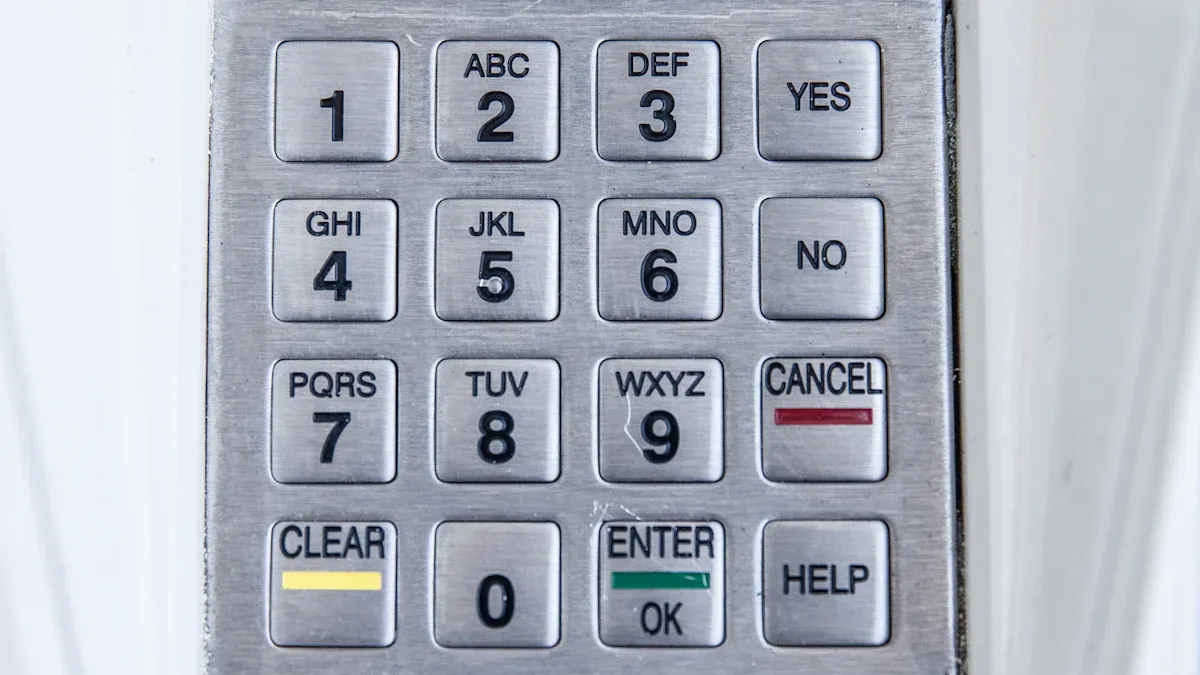
Eine Zutrittskontrolltastatur ist ein Gerät, das auf der Grundlage eines Zahlencodes Zutritt gewährt oder verweigert. Diese Tastaturen sind für die professionelle Sicherheit von entscheidender Bedeutung. Sie sind ein wesentlicher Bestandteil der modernen Sicherheitsinfrastruktur. Unternehmen nutzen sie, um Vermögenswerte zu schützen und zu kontrollieren, wer bestimmte Bereiche betritt. Sie fügen eine starke Ebene digitaler Sicherheit hinzu.
Key Takeaways
- Mithilfe von Zutrittskontrolltastaturen können Unternehmen kontrollieren, wer bestimmte Bereiche betritt. Sie schützen wichtige Vermögenswerte und Informationen.
- Tastaturen bieten viele Vorteile. Sie erhöhen die Sicherheit, sparen Geld und vereinfachen die Zugriffsverwaltung.
- Moderne Tastaturen verfügen über erweiterte Funktionen. Dazu gehören Multi-Faktor-Authentifizierung und Fernsteuerung. Sie können auch mit anderen Sicherheitssystemen verbunden werden.
Funktionsweise einer Zutrittskontrolltastatur
Grundlegende Betriebsprinzipien
Eine Zutrittskontrolltastatur funktioniert nach einem einfachen, aber effektiven Prinzip. Ein Benutzer gibt einen eindeutigen Zahlencode oder eine PIN in das Gerät ein. Die Tastatur verarbeitet diese Eingabe dann. Wenn der eingegebene Code mit einem vorprogrammierten Code im Speicher übereinstimmt, sendet das System ein elektronisches Signal. Dieses Signal aktiviert typischerweise einen Verriegelungsmechanismus, wie z. B. einen elektrischen Türöffner oder ein Magnetschloss, und ermöglicht so den Zutritt. Stimmt der Code nicht überein, verweigert das System den Zugriff. Dieser Prozess stellt sicher, dass nur autorisierte Personen einen gesicherten Zugangspunkt passieren können.
Schlüsselkomponenten eines Tastatursystems
Ein typisches Tastatursystem besteht aus mehreren wesentlichen Teilen. Erstens verfügt die Tastaturschnittstelle über Tasten, mit denen Benutzer ihre Codes eingeben können. Zweitens fungiert ein Mikroprozessor oder Controller als Gehirn des Systems. Es verwaltet alle Vorgänge. Drittens speichert der interne Speicher die gültigen Zugangscodes. Viertens wird ein Ausgangsrelais mit dem Türschloss verbunden und sendet das Entriegelungssignal. Schließlich versorgt ein Netzteil das gesamte System mit Strom. Einige fortschrittliche Tastaturen umfassen auch Anzeigen wie LEDs oder akustische Alarme, um den Status anzuzeigen.
Authentifizierung und Datenverarbeitung
Die Authentifizierung ist der Kern der Funktion einer Tastatur. Wenn jemand einen Code eingibt, vergleicht der interne Prozessor der Tastatur diesen sofort mit der Liste der autorisierten Codes in seinem Speicher. Dieser Vergleich erfolgt in Millisekunden. Wenn das System eine Übereinstimmung findet, authentifiziert es den Benutzer und löst die Zugriffsgewährung aus. Wenn keine Übereinstimmung vorliegt, verweigert das System den Zugriff. Viele Tastaturen protokollieren diese Versuche auch und erstellen eine Aufzeichnung darüber, wer wann versucht hat, einzutreten. Diese Datenverarbeitung gewährleistet Sicherheit und bietet wertvolle Prüfprotokolle für Administratoren.
Arten von Zugangskontrolltastaturen
Eigenständige Tastatursysteme
Standalone-Tastatursysteme arbeiten unabhängig. Sie stellen keine Verbindung zu einem zentralen Netzwerk her. Sie programmieren jede Tastatur einzeln. Dadurch sind sie einfach zu installieren und zu bedienen. Sie speichern Zugangscodes direkt in ihrem internen Speicher. Viele kleine Unternehmen oder Einzelbüros nutzen diese Systeme. Sie bieten eine kostengünstige Lösung zur Sicherung einer einzelnen Tür oder einiger Einstiegspunkte.
Vernetzte Tastatursysteme
Vernetzte Tastatursysteme stellen eine Verbindung zu einem zentralen Computer oder Sicherheitsnetzwerk her. Diese Verbindung ermöglicht eine Fernverwaltung. Das Sicherheitspersonal kann von einer zentralen Stelle aus Benutzercodes hinzufügen oder entfernen. Sie können Zugriffsereignisse auch in Echtzeit überwachen. Diese Systeme bieten mehr Kontrolle und Flexibilität. Große Organisationen wie Universitäten oder Unternehmensgelände entscheiden sich häufig für vernetzte Tastaturen. Sie lassen sich gut mit anderen Sicherheitsfunktionen integrieren.
Kabelgebundene vs. kabellose Zugangskontrolltastaturen
Kabelgebundene Zutrittskontrolltastaturen werden direkt an Strom- und Datenleitungen angeschlossen. Dies sorgt für eine stabile und zuverlässige Verbindung. Sie nutzen häufig Power over Ethernet (PoE) für Strom und Daten. Drahtlose Tastaturen hingegen nutzen Batterien und kommunizieren über Funkfrequenzen. Sie bieten eine einfachere Installation, da keine aufwändige Verkabelung erforderlich ist. Bei drahtlosen Optionen ist jedoch eine Batteriewartung erforderlich und es kann manchmal zu Signalstörungen kommen.
Mechanische vs. elektronische Tastaturoptionen
Mechanische Tastaturen funktionieren ohne Strom. Normalerweise drücken Benutzer eine Reihe von Tasten oder drehen einen Drehknopf, um die Tür zu entriegeln. Sie sind in rauen Umgebungen sehr langlebig und zuverlässig. Sie bieten jedoch begrenzte Sicherheitsfunktionen und keinen Prüfpfad. Elektronische Tastaturen nutzen elektrische Schaltkreise. Sie bieten erweiterte Funktionen wie mehrere Benutzercodes, zeitgesteuerten Zugriff und Integration mit anderen Systemen. Sie erfordern eine Stromquelle, bieten aber viel höhere Sicherheits- und Verwaltungsfunktionen.
Designüberlegungen für Zugangskontrolltastaturen
Umweltverträglichkeit und Schutz
Denken Sie bei der Auswahl einer Tastatur darüber nach, wo sie angebracht werden soll. Außentastaturen sind Regen, Staub und großen Temperaturschwankungen ausgesetzt. Sie benötigen starke Materialien wie Edelstahl oder robuste Kunststoffe. Achten Sie auf eine IP-Einstufung wie IP65 oder IP66. Hier erfahren Sie, wie gut es Wasser und Staub abhält. Eine langlebige Tastatur hält länger und funktioniert zuverlässig, egal bei welchem Wetter.
Ästhetische Integration im beruflichen Umfeld
Tastaturen sollten nicht fehl am Platz wirken. In professionellen Gebäuden müssen sie mit dem bestehenden Design harmonieren. Viele Tastaturen sind in einem eleganten, modernen Stil erhältlich. Sie sind in verschiedenen Ausführungen erhältlich, beispielsweise in gebürstetem Metall oder mattschwarz. Einige Tastaturen werden bündig mit der Wand installiert, sodass sie nahezu unsichtbar sind. Dies trägt dazu bei, dass Ihr Eingang sauber und professionell aussieht.
Benutzeroberfläche und Ergonomie
Eine gute Tastatur ist für jeden einfach zu bedienen. Die Tasten sollten groß genug sein, um bequem gedrückt zu werden. Sie sollten beim Drücken auch ein deutliches Klicken oder Gefühl erzeugen. Durch die Hintergrundbeleuchtung können Menschen die Zahlen auch im Dunkeln erkennen. Klare Töne oder Lichter können eine erfolgreiche Eingabe bestätigen. Ein benutzerfreundliches Design sorgt für einen reibungslosen und problemlosen täglichen Zugriff.
Funktionen zur Manipulationssicherheit
Sicherheitstastaturen müssen Angriffsversuchen standhalten. Sie haben oft ein stabiles Gehäuse, das ein Aufhebeln verhindert. Manche Tastaturen lösen einen Alarm aus, wenn jemand versucht, sie von der Wand zu entfernen. Andere verfügen über Sensoren, die einen gewaltsamen Zutritt erkennen. Diese Funktionen schützen die Tastatur selbst und machen die Sicherheitskräfte auf verdächtige Aktivitäten aufmerksam. 🚨
Praktische Anwendungen von Zugangskontrolltastaturen
Tastaturen bieten leistungsstarke Sicherheitslösungen für viele verschiedene Umgebungen. Sie helfen Organisationen dabei, zu verwalten, wer wohin geht. Schauen wir uns an, wie verschiedene Branchen diese Systeme nutzen.
Gewerbe- und Bürogebäude
Unternehmen nutzen Tastaturen, um ihre Büros zu schützen. Sie werden häufig an Haupteingängen oder an Türen zu sensiblen Bereichen installiert. Denken Sie an Serverräume, Chefetagen oder Rechenzentren. Der Zutritt zu diesen Orten ist nur autorisiertem Personal gestattet. Dies schützt wertvolle Unternehmensinformationen und -geräte. Beispielsweise könnte ein Mitarbeiter einen Code eingeben, um außerhalb der Geschäftszeiten in seine Abteilung zu gelangen. Einige Unternehmen geben Besuchern sogar temporäre Codes, die nach einem Tag ablaufen. Dies macht die Zugriffsverwaltung einfach und sicher.
Industrieanlagen und Lagerhallen
Industriestandorte und Lagerhallen lagern wertvolle Güter und verfügen oft über gefährliche Bereiche. Bei der Sicherung dieser Standorte spielen Tastaturen eine große Rolle. Sie tragen dazu bei, den Diebstahl von Inventar zu verhindern. Sie kontrollieren auch, wer Zugang zu Zonen mit schweren Maschinen oder Gefahrstoffen hat. Dadurch wird die Sicherheit der Arbeitnehmer gewährleistet und die Einhaltung der Sicherheitsvorschriften sichergestellt. Stellen Sie sich vor, ein Arbeiter benötigt einen bestimmten Code, um einen Chemikalienlagerraum zu betreten. Dieses System verfolgt, wer wann eintritt, was sich positiv auf die Verantwortlichkeit auswirkt.
Bildungseinrichtungen und Campus
Schulen, Hochschulen und Universitäten haben viele Gebäude und Menschen. Sie benötigen robuste Sicherheit zum Schutz von Studenten, Mitarbeitern und Vermögenswerten. Tastaturen helfen bei der Sicherung von Klassenzimmern, Wissenschaftslabors, Wohnheimen und Verwaltungsbüros. Sie können den Zugang zu bestimmten Gebäuden außerhalb der Schulzeit beschränken. Beispielsweise könnte ein Lehrer einen Code verwenden, um sein Klassenzimmer frühmorgens zu betreten. Studenten haben möglicherweise Codes für ihre Gemeinschaftsräume im Wohnheim. Dies trägt dazu bei, eine sicherere Lernumgebung für alle zu schaffen.
Gesundheitsumgebungen
Krankenhäuser und Kliniken gehen mit sensiblen Patienteninformationen und wertvollen Medikamenten um. Tastaturen sind für die Wahrung der Privatsphäre und Sicherheit in diesen Umgebungen unerlässlich. Sie kontrollieren den Zugang zu Apotheken, Operationssälen und Lagerbereichen für Patientenakten. Dies trägt zur Einhaltung von Datenschutzgesetzen wie HIPAA bei. Außerdem wird verhindert, dass Unbefugte an Medikamente oder medizinische Geräte gelangen. Eine Krankenschwester könnte beispielsweise einen Code verwenden, um einen Medikamentenschrank zu öffnen. Dadurch wird sichergestellt, dass nur autorisiertes medizinisches Personal mit empfindlichen Gegenständen umgeht.
Regierungs- und Hochsicherheitszonen
Regierungsgebäude, Militärstützpunkte und kritische Infrastrukturstandorte erfordern ein Höchstmaß an Sicherheit. Tastaturen sind ein wesentlicher Bestandteil ihrer vielschichtigen Sicherheitsstrategien. Sie schützen Verschlusssachen und nationale Vermögenswerte. Diese Systeme arbeiten häufig mit anderen Sicherheitsmaßnahmen zusammen, beispielsweise mit biometrischen Scannern. Sie stellen sicher, dass nur geprüftes Personal stark eingeschränkte Bereiche betreten darf. Jeder Eingabeversuch wird protokolliert, wodurch ein detaillierter Prüfpfad erstellt wird. Dies ist von entscheidender Bedeutung für die Aufrechterhaltung einer strengen Kontrolle und Verantwortlichkeit in sensiblen Bereichen.
Hauptvorteile von Zutrittskontrolltastaturen
Zutrittskontrolltastaturen bieten viele Vorteile für professionelle Sicherheitsprojekte. Sie machen Orte sicherer und einfacher zu verwalten. Unternehmen finden sie sehr nützlich, um ihr Eigentum und ihre Menschen zu schützen.
Verbesserte Sicherheit und Kontrolle
Tastaturen bieten Unternehmen starke Sicherheit. Sie lassen nur autorisierte Personen bestimmte Bereiche betreten. Dadurch gelangen weniger Unbefugte in sensible Räume oder Gebäude. Beispielsweise verhindert eine Tastatur, dass jemand ohne den richtigen Code einen Serverraum betritt. Dadurch werden wertvolle Vermögenswerte und private Informationen geschützt. Sie entscheiden, wer wohin geht, und die Tastatur setzt diese Regeln durch. Es fügt jeder Einrichtung eine entscheidende Schutzschicht hinzu.
Kosteneffizienz und Effizienz
Denken Sie an herkömmliche Schlüssel. Wenn jemand einen Schlüssel verliert, müssen möglicherweise alle Schlösser ausgetauscht werden. Das kostet viel Geld und kostet Zeit. Mit einer Zugangskontrolltastatur ändern Sie einfach einen Code. Dadurch sparen Unternehmen Geld für Schlosser und neue Schlüssel. Außerdem wird die Zugriffsverwaltung dadurch wesentlich schneller. Sie müssen keine physischen Schlüssel aushändigen oder diese abholen, wenn jemand geht. Dieses System arbeitet effizient und reduziert die laufenden Kosten.
Vereinfachtes Zugriffsmanagement
Mit Tastaturen wird die Verwaltung, wer ein Gebäude betreten darf, viel einfacher. Sie können ganz einfach neue Benutzercodes für neue Mitarbeiter hinzufügen. Sie können auch schnell Codes für Personen entfernen, die keinen Zugriff mehr benötigen. Das heißt, Sie müssen sich keine Sorgen machen, dass alte Schlüssel herumschwirren. Bei vernetzten Systemen können Sie dies alles von einem zentralen Computer aus erledigen. Dies macht die Zugriffskontrolle unkompliziert und bereitet Administratoren weniger Kopfschmerzen.
Umfassende Audit-Trail-Funktionen
Viele Tastaturen zeichnen jeden Eingabeversuch auf. Sie protokollieren, wer wann eingetreten ist und auch, wenn er einen falschen Code eingegeben hat. Dadurch wird ein detaillierter Verlauf bzw. „Audit Trail“ erstellt. Wenn etwas schief geht, können Sie diese Aufzeichnungen einsehen. Sie helfen Ihnen zu verstehen, was passiert ist und wer daran beteiligt war. Diese Daten sind für Ermittlungen und zur Rechenschaftspflicht der Menschen sehr wertvoll. Es gibt Ihnen die Gewissheit, dass Sie über eine Aktivitätsaufzeichnung verfügen.
Skalierbarkeit und Flexibilität
Tastatursysteme können mit Ihrem Unternehmen wachsen. Sie können mit ein paar Tastaturen beginnen und weitere hinzufügen, wenn sich Ihre Anforderungen ändern. Sie bieten auch große Flexibilität. Sie können unterschiedliche Codes für unterschiedliche Personen oder Tageszeiten festlegen. Beispielsweise könnte das Reinigungspersonal einen Code haben, der nur außerhalb der Geschäftszeiten funktioniert. Tastaturen können auch in andere Sicherheitssysteme wie Alarme oder Videoüberwachung integriert werden. Dies macht sie zu einer vielseitigen Wahl für jede professionelle Sicherheitseinrichtung.
Erweiterte Funktionen von Zutrittskontrolltastaturen
Moderne Sicherheit erfordert mehr als nur einen einfachen Code. Heutige Tastaturen bieten erweiterte Funktionen. Diese Fähigkeiten machen Sicherheitssysteme stärker und einfacher zu verwalten. Sie bieten einen größeren Schutz für Ihr Eigentum.
Integration der Multi-Faktor-Authentifizierung
Einige Tastaturen lassen sich jetzt mit anderen Sicherheitsmethoden kombinieren. Dies wird als Multi-Faktor-Authentifizierung (MFA) bezeichnet. Das bedeutet, dass Sie mehr als eine Möglichkeit benötigen, Ihre Identität nachzuweisen. Beispielsweise können Sie eine PIN eingeben Und eine Karte durchziehen. Oder Sie könnten einen Code verwenden Und Scannen Sie Ihren Fingerabdruck. Dieser zusätzliche Schritt erschwert den Zutritt Unbefugter erheblich und erhöht Ihre Sicherheit deutlich.
Integration in andere Sicherheitssysteme
Tastaturen müssen nicht alleine funktionieren. Sie verbinden sich oft mit anderen Sicherheitstools. Denken Sie an Alarmsysteme, CCTV-Kameras oder Gebäudemanagementsoftware. Wenn eine Tastatur integriert wird, entsteht ein einheitliches Sicherheitsnetzwerk. Wenn jemand versucht, die Tastatur zu manipulieren, kann das System einen Alarm auslösen. Auch Kameras können mit der Aufnahme beginnen. Dadurch erhalten Sie ein vollständiges Bild und können schneller auf Sicherheitsereignisse reagieren.
Remote -Management -Funktionen
Administratoren können jetzt viele Tastaturen aus der Ferne verwalten. Sie müssen nicht an jeder Tür persönlich anwesend sein. Sie können neue Benutzercodes hinzufügen oder alte von einem zentralen Computer entfernen. Sie können Zugriffsprotokolle auch aus der Ferne anzeigen und Einstellungen ändern. Diese Funktion spart Zeit und Aufwand. Dies ist besonders nützlich für Unternehmen mit mehreren Standorten oder großen Einrichtungen.
Biometrische Integrationsoptionen
Einige fortschrittliche Tastaturen funktionieren sogar mit biometrischen Daten. Dies bedeutet, dass sie einzigartige physische Merkmale zur Identifizierung verwenden können. Fingerabdruckscanner sind weit verbreitet. Auch die Gesichtserkennung erfreut sich immer größerer Beliebtheit. Wenn Sie eine Tastatur mit Biometrie kombinieren, müssen Sie sich keine Codes mehr merken. Es bietet eine sehr sichere und bequeme Möglichkeit, Zugriff zu gewähren.
Auswahl des richtigen Zutrittskontroll-Tastatursystems
Beurteilung spezifischer Sicherheitsbedürfnisse
Bevor Sie sich für ein System entscheiden, müssen Sie Ihre genauen Sicherheitsanforderungen kennen. Was schützen Sie? Ist es ein kleines Büro oder ein großes Lager? Wie viele Personen benötigen Zugang? Benötigen Sie eine einfache Zutrittskontrolle oder eine Hochsicherheitslösung? Berücksichtigen Sie auch die Umgebung. Eine Außentastatur muss rauem Wetter standhalten. Bei einem Indoor-Modell liegt der Schwerpunkt möglicherweise mehr auf dem guten Aussehen. Wenn Sie über diese Fragen nachdenken, können Sie die richtigen Funktionen auswählen.
Haushaltsüberlegungen
Kosten spielen immer eine Rolle. Schauen Sie über den ursprünglichen Kaufpreis hinaus. Denken Sie an die Installationskosten. Benötigen Sie professionelle Hilfe? Denken Sie auch an die laufende Wartung. Einige Systeme erfordern mehr Wartung als andere. Ein günstigeres System kann auf lange Sicht teurer sein, wenn es häufig kaputt geht. Ein gutes System bietet langfristigen Wert und Zuverlässigkeit.
Compliance und behördliche Anforderungen
Bestimmte Branchen haben strenge Sicherheitsregeln. Beispielsweise müssen Gesundheitseinrichtungen HIPAA für Patientendaten befolgen. Regierungsgebäude haben ihre eigenen Standards. Stellen Sie sicher, dass das von Ihnen gewählte System alle erforderlichen Vorschriften erfüllt. Die Nichtbeachtung dieser Regeln kann zu hohen Geldstrafen führen. Prüfen Sie immer, welche Regeln für Ihr spezifisches Unternehmen gelten.
Ruf und Support des Anbieters
Die Wahl eines guten Anbieters ist entscheidend. Haben sie einen guten Ruf? Lesen Sie Rezensionen und fragen Sie nach Referenzen. Ein guter Kundensupport macht einen großen Unterschied. Welche Art von Garantie bieten sie an? Bieten sie technische Hilfe an, wenn Sie Probleme haben? Ein zuverlässiger Anbieter sorgt dafür, dass Ihr System jahrelang einwandfrei funktioniert.
Installation und Wartung von Zugangskontrolltastaturen
Bedeutung einer professionellen Installation
Man könnte meinen, die Installation einer Sicherheitstastatur sei eine einfache Aufgabe. Für zuverlässige Sicherheit ist jedoch eine fachgerechte Installation von entscheidender Bedeutung. Experten verstehen komplexe Verkabelungen und Systemkonfigurationen. Sie gewährleisten eine ordnungsgemäße Montage und verhindern so Manipulationen. Auch Profis testen das System auf Herz und Nieren und stellen sicher, dass es vom ersten Tag an einwandfrei funktioniert. Dies verhindert kostspielige Fehler und stellt sicher, dass Ihr Sicherheitssystem alle Sicherheitsstandards erfüllt. Ein korrekt installiertes System gibt Ihnen Sicherheit.
Regelmäßige Systemprüfungen und Updates
So wie Ihr Auto regelmäßig gewartet werden muss, muss auch Ihr Sicherheitssystem fortlaufend überprüft werden. Techniker sollten Tastaturen, Schlösser und Netzteile regelmäßig überprüfen. Sie suchen nach Anzeichen von Abnutzung oder Beschädigung. Diese Routineprüfungen erkennen kleine Probleme, bevor sie zu großen Problemen werden. Außerdem entwickeln sich Sicherheitsbedrohungen ständig weiter. Regelmäßige Updates schützen Ihr System vor neuen Schwachstellen. Dieser proaktive Ansatz gewährleistet eine hohe Leistung und Zuverlässigkeit.
Software- und Firmware-Management
Moderne Tastaturen basieren häufig auf hochentwickelter Software und Firmware. Diese Programme steuern, wie das System funktioniert. Sie müssen sie richtig verwalten. Hersteller veröffentlichen häufig Updates für ihre Software und Firmware. Diese Updates beheben Fehler, verbessern Funktionen und schließen Sicherheitslücken. Wenn Sie diese Updates vernachlässigen, kann Ihr System anfällig für Cyberangriffe werden. Stellen Sie immer sicher, dass Ihr Sicherheitsanbieter die Software Ihres Systems auf dem neuesten Stand hält. Dies schützt Ihre Investition und sorgt für die Sicherheit Ihrer Anlage.
Zutrittskontrolltastaturen sind für die moderne Sicherheit unerlässlich. Sie geben Unternehmen eine starke Kontrolle darüber, wer ihre Räume betritt. Sie können Ihr Vermögen und Ihre Mitarbeiter effektiv schützen. Strategische Planung hilft Ihnen, die größtmögliche Sicherheit aus diesen Systemen zu ziehen. Denken Sie über Ihre Bedürfnisse nach und integrieren Sie diese gut.
FAQ
Was passiert, wenn jemand seinen Zugangscode vergisst?
Administratoren können den Code einfach zurücksetzen oder einen neuen ausstellen. Vernetzte Systeme ermöglichen Änderungen aus der Ferne. Standalone-Geräte erfordern eine direkte Programmierung.
Funktionieren Zutrittskontrolltastaturen auch bei einem Stromausfall?
Einige Tastaturen verfügen über Batterie-Backups. Mechanische Tastaturen benötigen keinen Strom. Elektronische Tastaturen ohne Backup funktionieren nicht.
Sind Zutrittskontrolltastaturen vor Hackerangriffen geschützt?
Moderne Tastaturen nutzen Verschlüsselung. Sie verfügen außerdem über eine Manipulationserkennung. Die Multi-Faktor-Authentifizierung sorgt für zusätzliche Sicherheit.
 German
  English
  French
  Japanese
  Korean
  Russian
  Spanish
  Italian
  Polish
  Arabic